Tip percentage chart: compare a choice with the actual base
Updated October 12, 2026 · 5-minute read · 8 sections
On a 100.00 bill, 18% of an 80.00 base is 14.40, while 15% of the full bill is 15.00. I compare the base as well as the rate. A tip percentage chart makes that difference visible before you choose what to pay.
State the amount the percentage multiplies
The ordinary formula is tip = base × percentage ÷ 100. The tip calculator uses either the full bill before an extra tip or that bill minus the included tax and service charge you itemize. These options do not add those portions again. They change only the amount that the rate multiplies.
For a base of 64.75 and 18%, the unrounded tip is 64.75 × 0.18 = 11.655. Half-up rounding to a cent gives 11.66. If the entered bill is also 64.75, the final payment is 76.41. If the chosen base differs from the bill because included portions were excluded, the final payment instead adds 11.66 to that larger existing bill.
Read a chart tied to one example
The table below uses a hypothetical bill and base of 64.75, with no itemized tax or service charge. Keeping the base fixed lets you compare the rates directly. The final totals include each tip after cent rounding.
| Rate | Additional tip | Final total |
|---|---|---|
| 0% | 0.00 | 64.75 |
| 5% | 3.24 | 67.99 |
| 10% | 6.48 | 71.23 |
| 12.5% | 8.09 | 72.84 |
| 15% | 9.71 | 74.46 |
| 18% | 11.66 | 76.41 |
| 20% | 12.95 | 77.70 |
| 25% | 16.19 | 80.94 |
At 12.5%, the unrounded tip is 64.75 ÷ 8 = 8.09375. It rounds to 8.09, making the total 72.84. At 5%, the unrounded tip is 3.2375 and rounds to 3.24, making the total 67.99. The table reports money after rounding, not every intermediate decimal from the multiplication.
Use mental fractions as a check
Ten percent is one tenth of the base; twenty percent is one fifth. Five percent is half of ten percent, and fifteen percent is ten plus five percent before the final rounding step. For a base of 64.75, ten percent is 6.475 and five percent is 3.2375. Together they give 9.7125, which rounds once to 9.71.
Rounding those pieces separately gives 6.48 + 3.24 = 9.72, a cent more. That does not invalidate the fraction method; it shows why intermediate rounding matters. Keep enough precision until the final tip amount. The calculator works in integer minor units with rational half-up rounding so a display format does not quietly choose a different result.
Compare different bases carefully
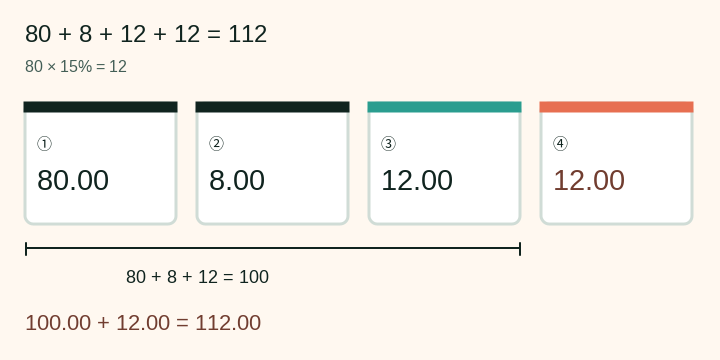
Suppose an existing receipt is 100.00, with 8.00 of included tax and 12.00 of included service. The reduced base is 80.00. An 18% extra tip on that reduced base is 14.40. A 15% extra tip on the full bill is 15.00. The smaller displayed percentage produces the larger amount because it applies to more money.
The corresponding final payments are 114.40 and 115.00. The existing charge is already inside each 100.00 bill; neither calculation adds it twice. A comparison that lists only the percentages would miss the reason for the difference. Read the included-charge guide when deciding how to label the base you chose.
Do not apply the chart to an included total
A chart of extra tips answers what to add to a bill. If a total already includes a stated tip, use reverse calculation instead. At a final 115.00 including a 15% tip on the bill, division by 1.15 recovers a bill of 100.00 and a tip of 15.00. Multiplying 115.00 by 15% would calculate a new amount of 17.25.
The comparison rows follow the selected mode. Add mode shows extra tips and the resulting totals. Included mode holds your final total fixed and separates the bill and tip at each rate. Choose the mode that matches the receipt you have.
A whole-number payment is an amount choice
For a bill of 99.99 and 18%, the rounded tip is 18.00 and the total is 117.99. Choosing to round the total up to 118.00 leaves an additional tip of 18.01. The percentage input remains 18 for comparison, but the receipt explicitly labels the rounded payment. It does not pretend the rounded amount is still the unmodified percentage calculation.
The comparison table shows ordinary rate scenarios before the round-up. Editing an input restores percentage calculation. Pressing a round-up button twice leaves an already whole amount unchanged. Rounding is disabled in included mode because its total is fixed.
Compare what the group actually pays
After choosing the tip, divide the final total in minor units rather than rounding an average for every person. A total of 76.41 shared by three is exactly 25.47 each. The 72.84 total from the 12.5% example divides by three as 24.28 each. Other totals can leave remainder cents, which are assigned to the first numbered shares.
Read the exact-share guide for the remainder rule. The live table shows the lowest and highest share when they differ. That range helps compare payment amounts, but the detailed list is what settles every unit. The tool makes an equal split and does not assign amounts based on individual dishes or previous payments.
If you already know the tip amount, choose Set tip amount instead. A 9.25 tip on a 62.87 bill produces 72.12 in total, or 18.03 each for four people. The comparison rows still show percentage alternatives; your chosen amount appears separately in the main result and copied receipt.
Choose a rate without letting the interface choose for you
- Read the receipt and check what is already included.
- Select the calculation mode and explicitly name the percentage base.
- Compare rates using the same base, or state why the bases differ.
- Review the final total, any active round-up and exact shares.
- Keep a local copy only if it helps the payment conversation.
Zero is a valid tip percentage, and the preset buttons are simply shortcuts. The calculator leaves the choice to you. This page provides general calculations, not financial, tax or legal advice. Check the receipt and local policy before adding a tip.
Copied or downloaded text preserves the base, rate, amounts and shares so the chart can be checked against the chosen scenario. Invalid fields remove earlier results from export, and a blocked clipboard offers selectable text. The tool does not send inputs or save them automatically; the wider site may contain advertising and analytics.
Quick answers
Why can 18% be less than 15%?
A percentage on a smaller base can produce a smaller amount. Compare both the rate and the amount it multiplies.
Should I round 10% and 5% separately for a 15% tip?
For the displayed half-up rule, combine the unrounded pieces and round the final tip once. Intermediate rounding can change a cent.
Does the comparison table include my rounded payment?
No. The rows show ordinary percentage scenarios. The main receipt separately labels an active exact round-up.