Split a bill with tip: where the remainder cents go
Updated October 12, 2026 · 5-minute read · 8 sections
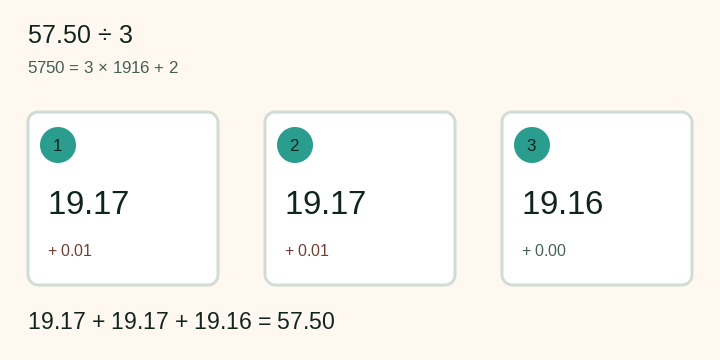
Three people cannot all pay the same whole-cent amount when the final bill is 57.50. I would settle that immediately as 19.17, 19.17 and 19.16 rather than display “19.17 each” and leave the group to discover the extra cent later. An equal split needs a remainder rule.
Split the final payment, not the intermediate parts
Start with the amount the group intends to pay after any additional tip. The tip calculator first calculates that final total, then divides it in whole minor units. Independently dividing the bill and tip and rounding every intermediate piece can create discrepancies. A single final allocation keeps the payment shares tied to one exact amount.
For the hypothetical bill of 50.00 and an additional 15%, the tip is 50.00 × 0.15 = 7.50. The final payment is 50.00 + 7.50 = 57.50. With three people, that becomes 5,750 cents ÷ 3: a whole-cent share of 1,916 and a remainder of 2. Give one of those cents to each of the first two numbered shares.
| Share | Base allocation | Remainder | Payment |
|---|---|---|---|
| 1 | 19.16 | 0.01 | 19.17 |
| 2 | 19.16 | 0.01 | 19.17 |
| 3 | 19.16 | 0.00 | 19.16 |
The payment list also shows the tip per person. Here the 7.50 tip divides exactly as 2.50 each. For a tip that leaves spare cents, the first numbered people receive them; the rest of each person’s payment is their bill portion. Those tip portions sum to the tip, and each bill portion plus tip matches the exact payment shown.
Make the remainder rule predictable
For total T in minor units and n people, the whole share is q = floor(T ÷ n), and the remainder is r = T mod n. The first r shares receive q + 1 units; the other n − r shares receive q. The sum is n × q + r, exactly T. Because r is smaller than n, no share receives more than one remainder unit.
The first numbered shares get the extra cent. Your group can assign them to anyone, or rotate the choice next time. The important part is that everyone sees a specific amount to pay and the shares add back to the bill.
Tiny payments expose the rounding problem
Consider a deliberately small arithmetic example: bill 0.03, tip 20%, three people. The unrounded tip is 0.03 × 0.20 = 0.006. Rounded half up to a cent, the tip becomes 0.01 and the final total becomes 0.04. Exact allocation is 0.02, 0.01 and 0.01. Three displayed shares of 0.01 would leave one cent unpaid.
The tiny example isolates a rounding error that can affect ordinary restaurant bills too. Showing two decimal places does not make a split exact: the calculator must also allocate the remainder. You can check that allocation in the payment list.
Work an ordinary four-person check
Suppose the existing receipt is 87.65 and your group chooses an additional 18% on the full bill. The unrounded tip is 87.65 × 0.18 = 15.777. Rounded half up, that is 15.78. The final total is 103.43. Dividing 10,343 cents by four gives a base share of 2,585 cents and three cents left.
The exact payments are therefore 25.86, 25.86, 25.86 and 25.85. Check the sum: 3 × 25.86 + 25.85 = 103.43. The difference between the highest and lowest share is one cent. Do not compare that list with an average rounded independently and assume the list must be wrong; the list is what reconciles the bill.
Rounding the total changes what you leave
If you choose to round the same 103.43 final total upward to 104.00, the additional tip becomes 104.00 − 87.65 = 16.35. That is 0.57 more than the ordinary percentage tip of 15.78. Four equal shares are now exactly 26.00. The cleaner share is obtained by increasing the payment, not by finding spare money inside the original total.
The receipt labels the round-up and retains the original percentage for comparison. Editing an input returns to percentage calculation. An already whole total stays unchanged if you press the round-up button again.
Use the right smallest unit
The calculator supports two-decimal amounts for USD, EUR, GBP, BRL, CAD and AUD, and whole-unit amounts for JPY. The same remainder method works in either case. For 101 JPY with a 15% extra tip, the unrounded tip is 15.15 JPY and rounds to 15 JPY. The final total of 116 JPY divides among three as 39, 39 and 38.
Changing the currency selector does not convert the amount using an exchange rate. It changes the selected unit and how the result is formatted. If you move from a two-decimal currency to JPY, a fractional amount must be corrected rather than silently rounded. Re-enter values in the unit you actually intend to pay.
Equal shares are not itemized shares
If diners ordered different meals, agree on the split before entering the people count. The calculator divides the entire chosen total equally. Personal items, shared dishes, deposits and earlier payments belong in your group’s separate agreement.
I separate that decision from the rounding problem. First agree what “equal” means for your group and whether the final amount is the one everyone intends to pay. Then use the exact list. Read the included-charge guide if a service line is already on the receipt, since an extra tip should not be added by accident.
Review the amounts before payment
- Verify the receipt amount and whether the tip is added or already included.
- Check the selected base and any included tax or charge.
- Agree on the additional percentage or optional round-up.
- Read every numbered payment and verify the displayed sum.
- Copy or download the local receipt if the group needs a reference.
These are general calculations, not financial, tax or legal advice. Before paying, check that the restaurant accepts separate payments. If one person pays the full bill instead, the share list can help the others repay that person without losing a cent.
Quick answers
Is a one-cent difference still an equal split?
It is the closest equal allocation available in whole minor units. The displayed shares differ by at most one unit and sum exactly to the total.
Does rounding each person up keep the original bill?
No. It can increase what the group pays. This tool instead distributes the exact remainder unless you deliberately round the tip or total in Add mode.
Can I split by what each person ordered?
This tool makes an equal split only. Different personal and shared items require a separate agreement.